
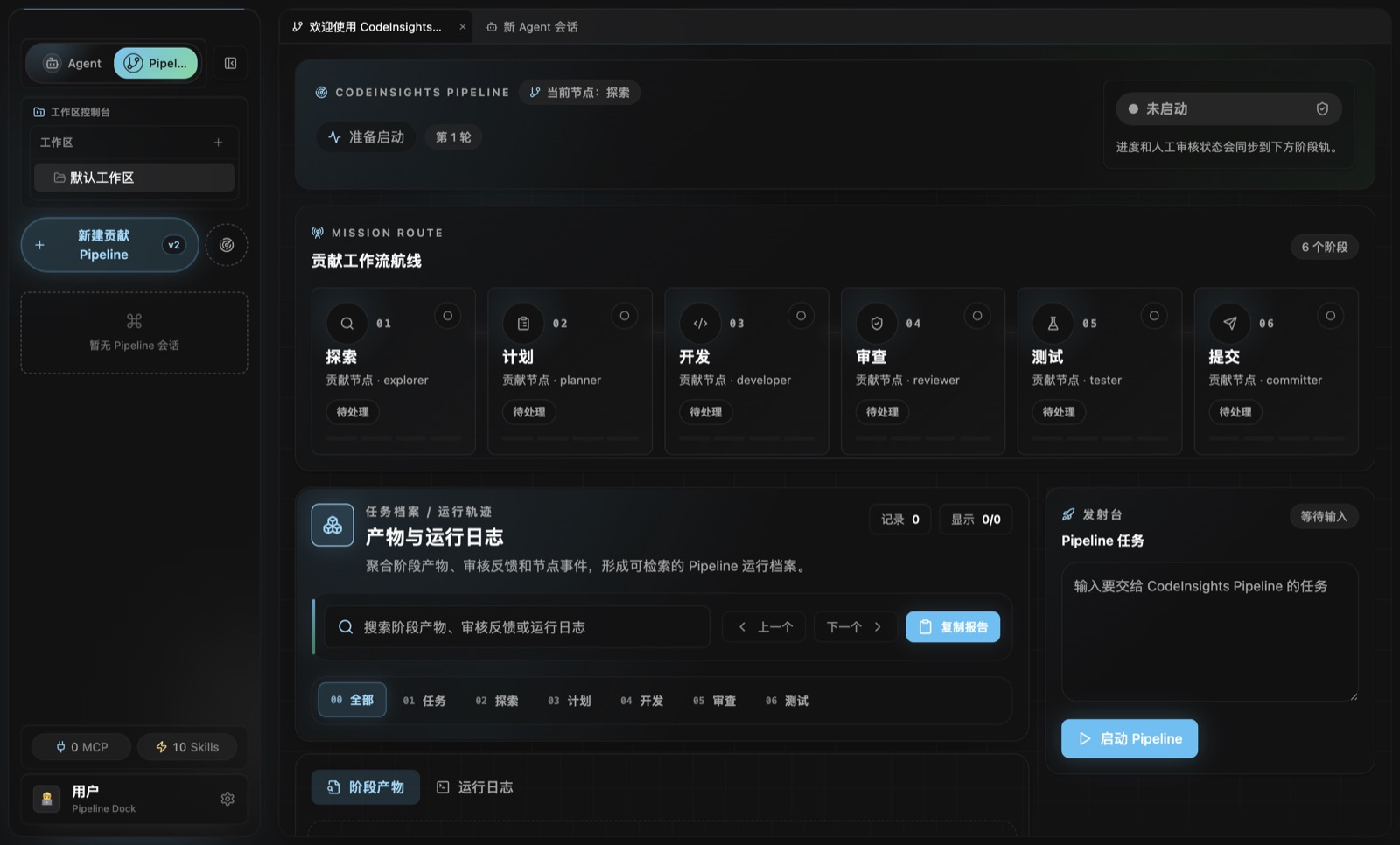
面向开源贡献的 AI Agent 桌面工作台 AI Agent desktop workbench for open-source contribution
CodeInsights
把开源贡献从“让模型试试”变成可计划、可审查、可验证的桌面工作流。Pipeline 安排阶段和证据,Agent 在本地工作区执行,JSONL 留下可回放记录。 Turn “ask a model to try” into planned, reviewable, verifiable contribution work.Pipeline structures the stages, Agent executes in your workspace, and JSONL keeps the replay trail.
为什么需要它 Why it exists
复杂贡献需要的不只是模型能力,而是过程质量 Complex contribution needs process quality, not only model capability
Shift
从“模型给答案”转向“过程可批准” From model answers to approvable process
CodeInsights 把任务拆成计划、执行和证据三层,让每一步都能被人接管、暂停、复查或恢复。 CodeInsights splits work into planning, execution, and evidence so each step can be paused, reviewed, resumed, or taken over by a human.
Problem
复杂修改容易失控 Complex edits drift easily
直接让 Agent 改仓库,很容易把风险、假设和验证缺口混进一段长输出里。 Letting an agent edit directly can bury risk, assumptions, and missing verification inside one long answer.
Control
把风险变成检查点 Turn risk into checkpoints
Pipeline 在计划、权限、AskUser 和人工 gate 处暂停,Agent 只在明确边界内执行。 Pipeline pauses at planning, permissions, AskUser, and human gates while Agent executes inside explicit boundaries.
Evidence
保留可回放证据 Keep replayable evidence
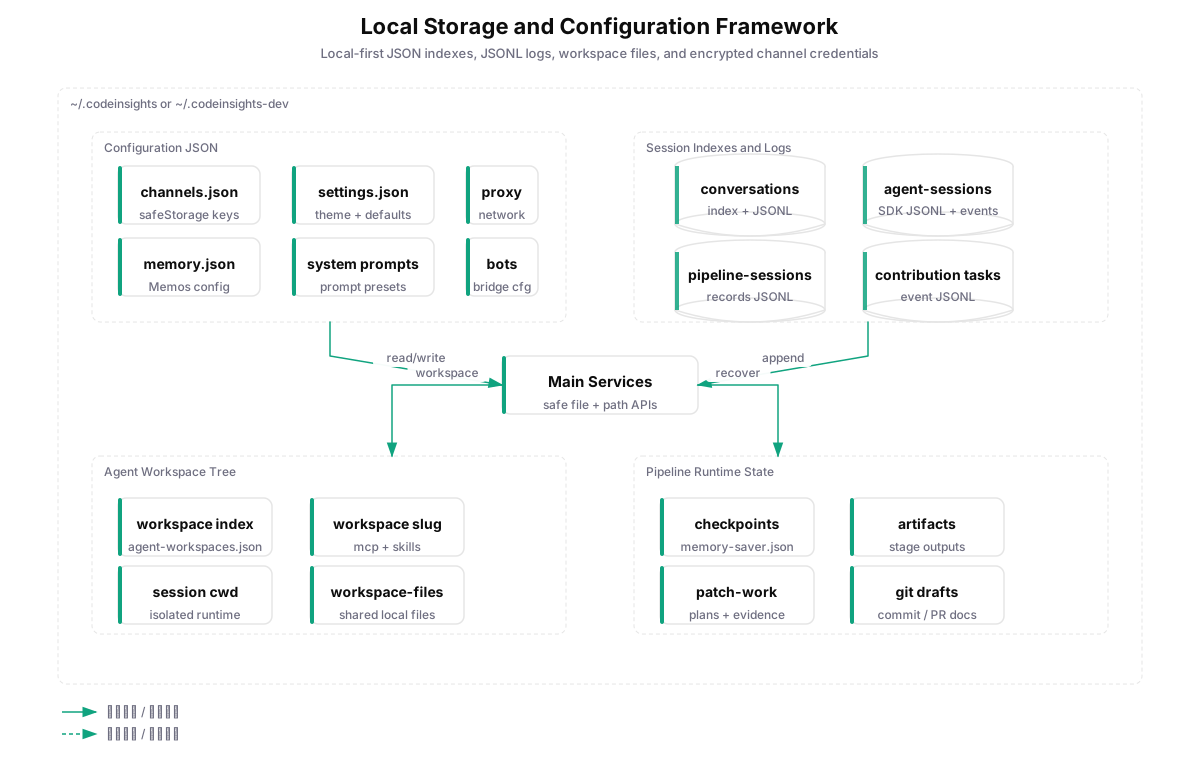
会话、事件、checkpoint、artifacts 和工作区文件优先落到本机,方便恢复、对比和排障。 Sessions, events, checkpoints, artifacts, and workspace files stay local first for recovery, comparison, and debugging.
plan.md
review.md
test evidence
JSONL events
checkpoint
真实产品界面 Real product surface
先看实际工作台,再看它背后的流程 See the workbench first, then the workflow behind it
以下素材来自真实 Electron 开发窗口,采集时使用隔离配置目录,避免读取本机已有渠道、会话和凭证。 These captures come from a real Electron development window using an isolated config directory to avoid local channels, sessions, and credentials.
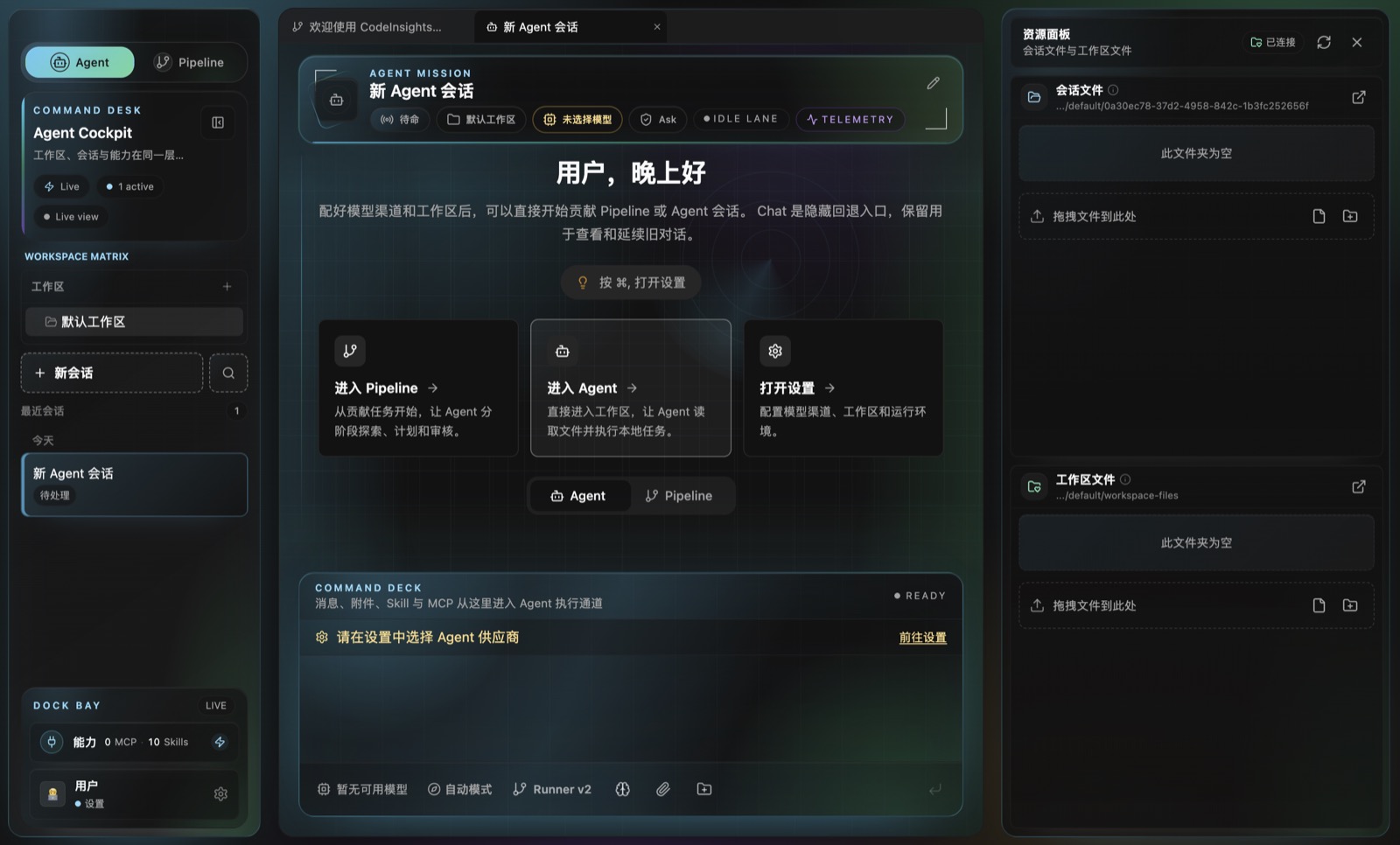
6 秒真实录屏 6-second real run
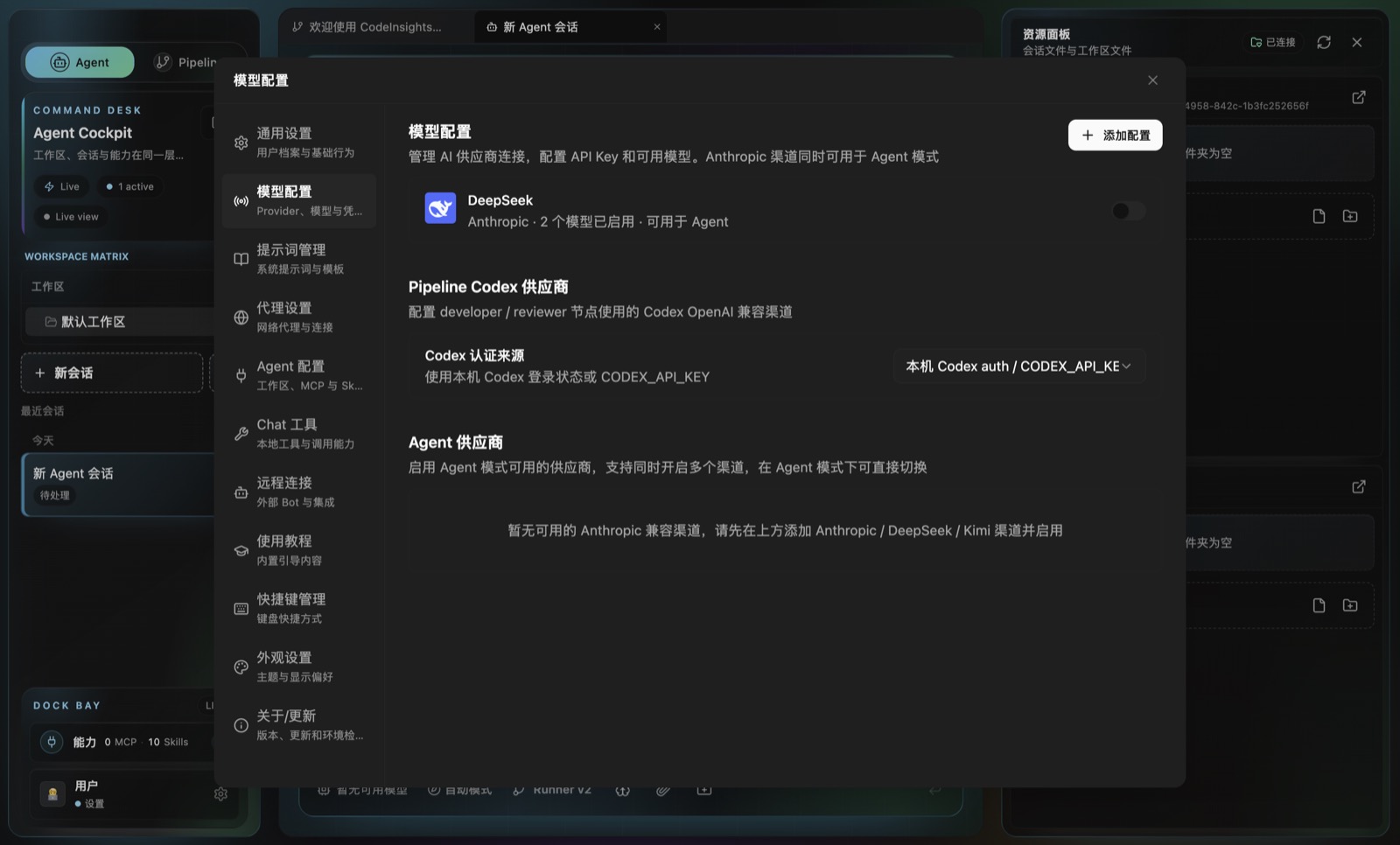
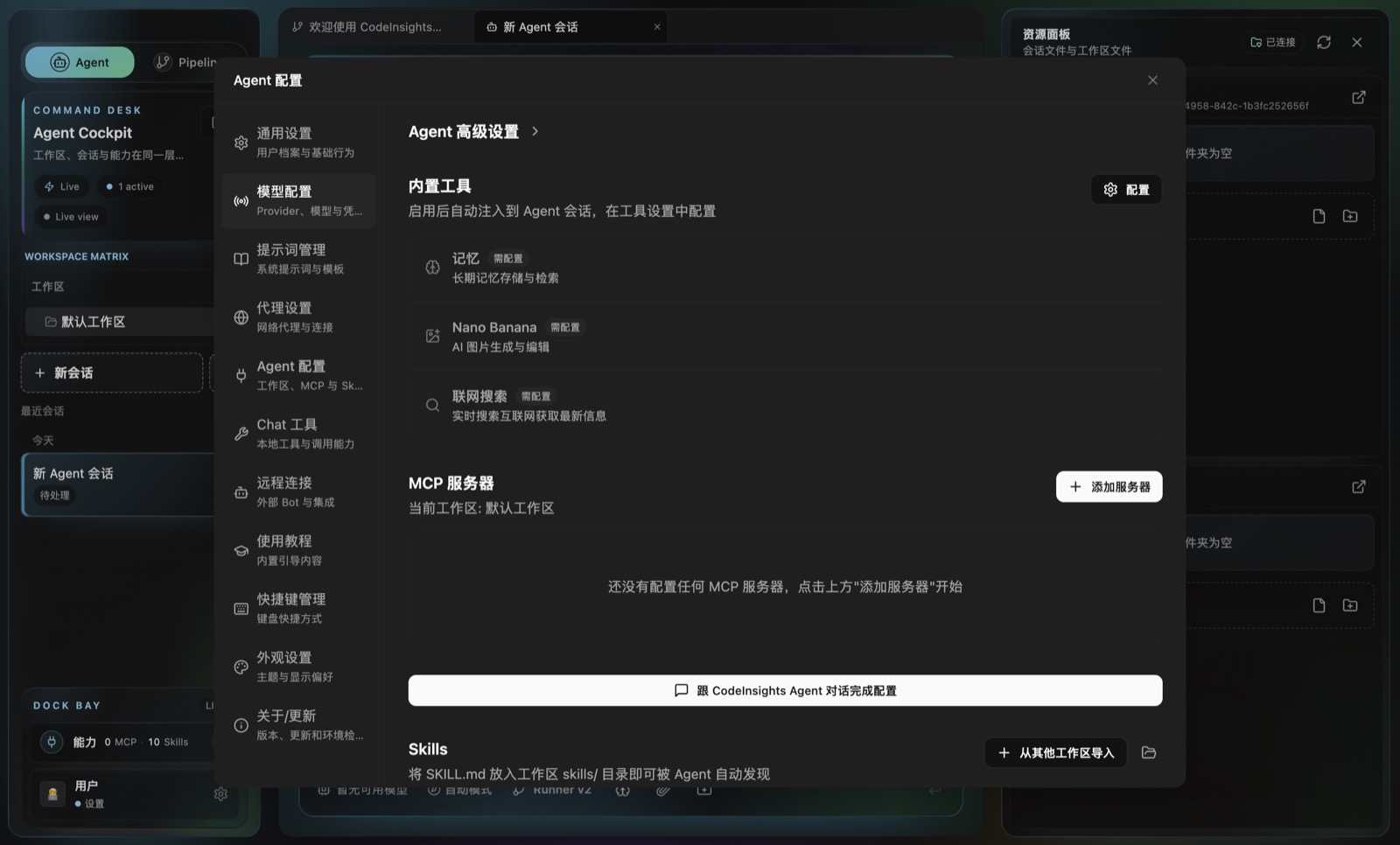
Pipeline、Agent、设置与回到 Pipeline 的实际桌面流 A real desktop pass through Pipeline, Agent, settings, and back to Pipeline
首页首屏使用真实 Pipeline 截图建立产品信号,这段录屏提供更完整的界面节奏。 The hero uses a real Pipeline screenshot for product signal; this video shows the broader interface rhythm.
- Pipeline 阶段轨道 Pipeline stage rail
- Agent 工作区 Agent workspace
- 模型与 MCP 配置 Model and MCP settings
Pipeline v2
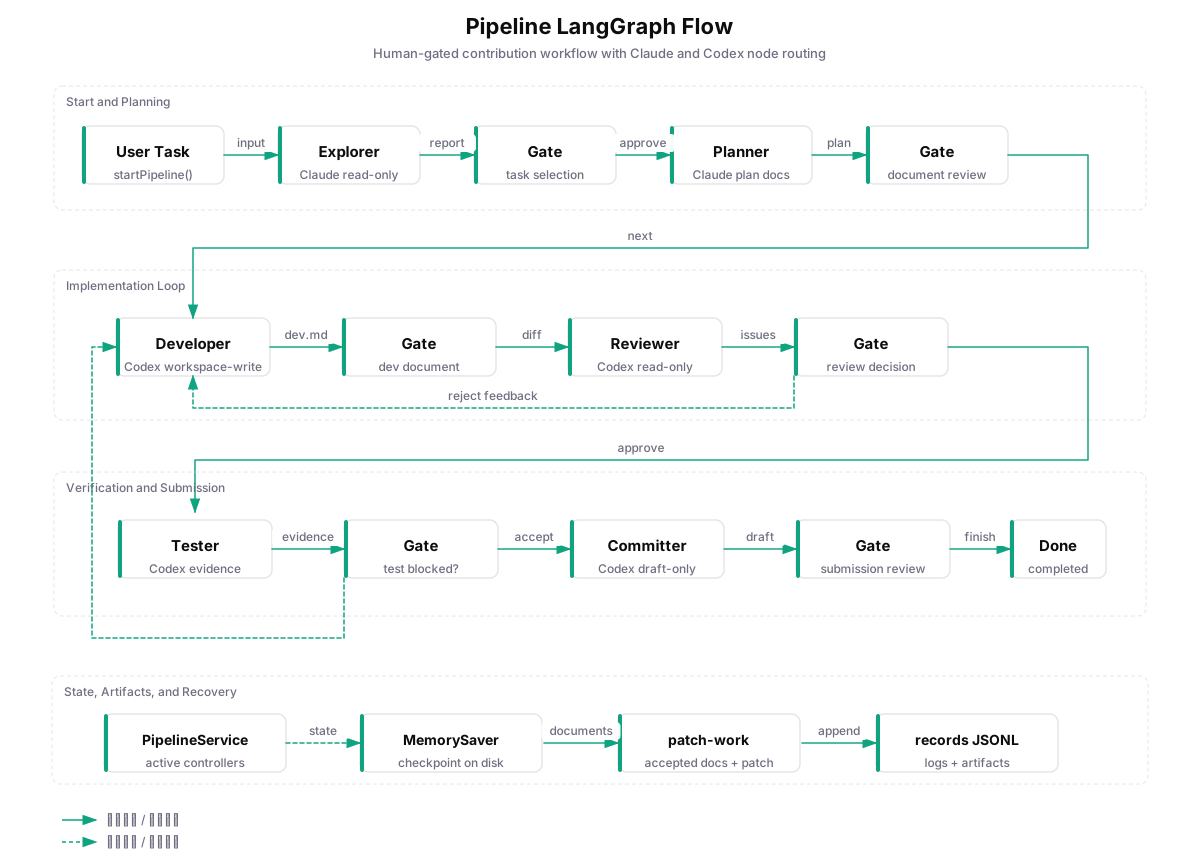
一条流水线覆盖发现、实现、审查、测试和提交材料 One pipeline covers discovery, implementation, review, testing, and submission drafting
发现与计划 Discover and plan
Explorer 阅读目标与仓库上下文,Planner 输出计划、风险、验证路径和可审查文档。 Explorer reads the goal and repository context; Planner produces the plan, risks, verification path, and reviewable documents.
实现与审查 Build and review
Developer 通过 Codex SDK / CLI 修改工作区,Reviewer 只读审查 diff、回归、安全和测试缺口。 Developer changes the workspace through Codex SDK / CLI; Reviewer checks diffs, regressions, security, and test gaps read-only.
验证与提交材料 Verify and draft
Tester 运行验证命令并收集证据,Committer 生成提交信息、PR 标题和正文草稿。 Tester runs verification commands and collects evidence; Committer drafts commit messages, PR titles, and PR bodies.
Agent Runtime
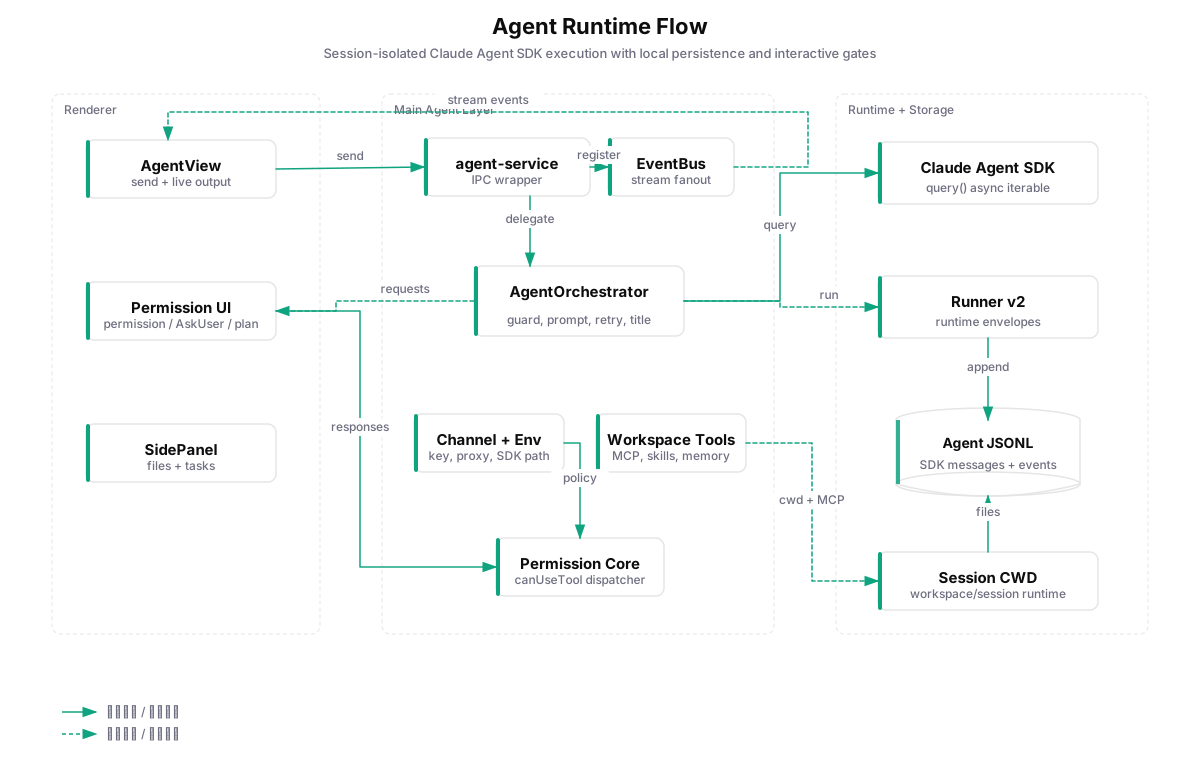
Agent 是执行面,权限、工作区和事件流是边界 Agent is the execution surface; permissions, workspaces, and event streams are the boundary
全局监听,不丢后台事件 Global listeners preserve background events
Agent IPC 监听器挂在 Renderer 顶层,页面切换时流式输出、权限请求和 AskUser 仍会进入 Jotai 状态。 Agent IPC listeners mount at the renderer root, so streams, permission requests, and AskUser prompts still enter Jotai state across view changes.
工作区隔离的 MCP / Skills Workspace-scoped MCP / Skills
每个工作区有独立 MCP 配置、Skills、workspace files 和 session cwd,适合长期任务与可审计自动化。 Each workspace has isolated MCP config, Skills, workspace files, and session cwd for long-running auditable automation.
Agent 兼容渠道边界清晰 Clear Agent-compatible provider boundary
Agent 模式当前面向 Anthropic Messages 兼容渠道:Anthropic、DeepSeek、Kimi API 和 Kimi Coding。 Agent mode targets Anthropic Messages compatible providers: Anthropic, DeepSeek, Kimi API, and Kimi Coding.
本地数据与架构 Local data and architecture
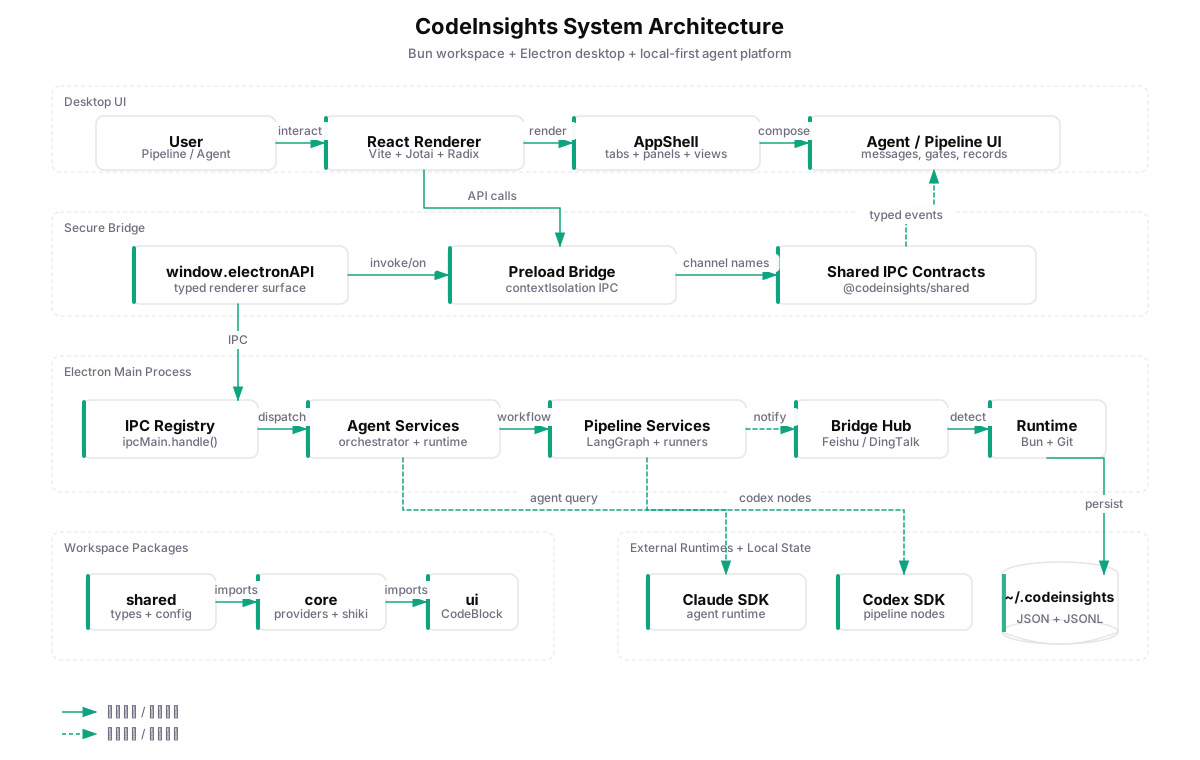
本地文件系统就是审计、恢复和迁移的基础设施 The local filesystem is the audit, recovery, and portability layer
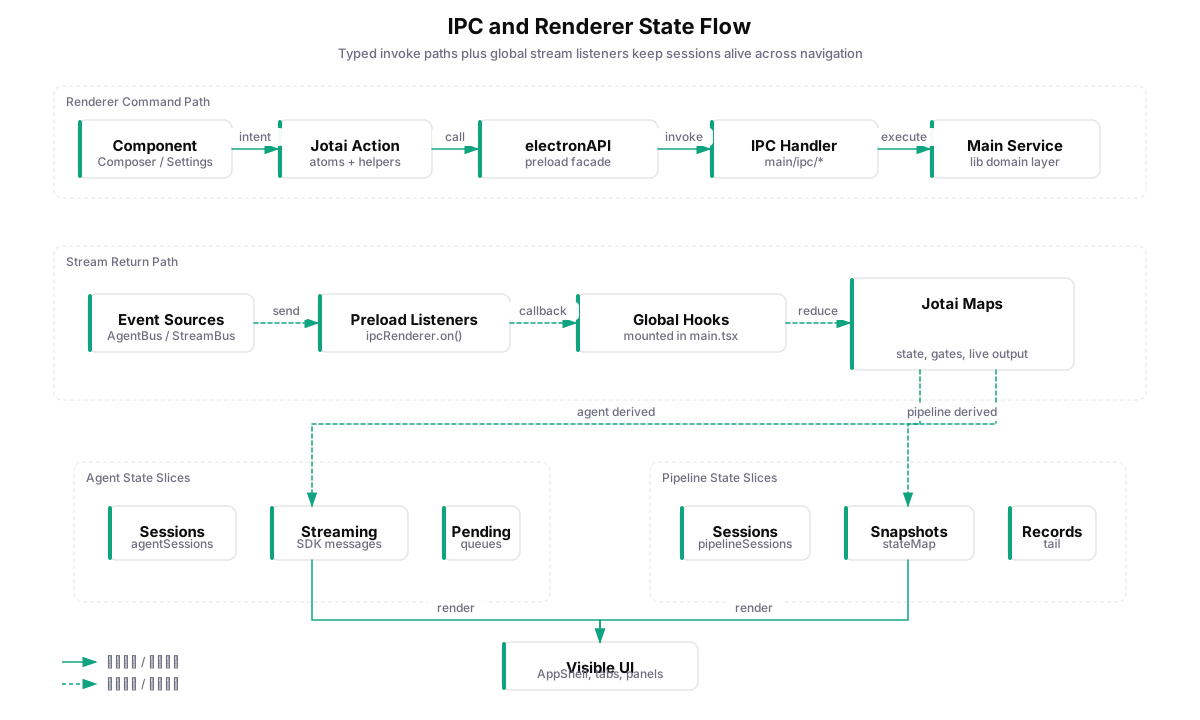
当前能力 Current capabilities
围绕桌面 Agent 协作所需的基础设施 Infrastructure for desktop Agent collaboration
Model Layer
Provider Adapters
Anthropic、OpenAI、DeepSeek、Google、Kimi、智谱、MiniMax、豆包、通义千问和自定义 OpenAI 兼容端点。 Anthropic, OpenAI, DeepSeek, Google, Kimi, Zhipu, MiniMax, Doubao, Qwen, and custom OpenAI-compatible endpoints.
Review Layer
Human Gates
工具权限、AskUser、ExitPlan、Pipeline gate 都按 session 隔离,后台会话不丢请求。 Tool permissions, AskUser, ExitPlan, and Pipeline gates are isolated per session, preserving background requests.
Bridge Layer
IM Bridge
飞书、钉钉、微信 Bridge 可以把远程消息转成本地桌面 Agent / Chat 会话请求。 Feishu, DingTalk, and WeChat bridges can turn remote messages into local desktop Agent / Chat session requests.
Context Layer
Documents
附件、PDF、Office、文本解析和文件预览贯穿 Chat 回退、Agent 工作区和任务资料。 Attachments, PDF, Office, text parsing, and file preview support Chat fallback, Agent workspaces, and task context.
Runtime Layer
Runtime Checks
Bun、Git、Node、WSL、Shell 环境、代理和自动更新由主进程统一检测与管理。 Bun, Git, Node, WSL, shell environment, proxy settings, and updater state are checked and managed from the main process.
Safety Layer
Security Boundary
Electron contextIsolation、preload 白名单、safeStorage 加密和 Codex Git guard 共同约束高风险操作。 Electron contextIsolation, preload allowlists, safeStorage encryption, and Codex Git guards constrain high-risk operations.
Quick Start
从源码运行 Electron 桌面应用 Run the Electron desktop app from source
项目使用 Bun workspace。开发模式默认写入隔离的 `~/.codeinsights-dev/`,不会污染正式版本配置。 The project uses Bun workspaces. Development mode writes to isolated `~/.codeinsights-dev/` by default.
准备环境 Prepare runtime
Bun 1.2.5+ · Git · macOS / Windows / Linux
配置渠道 Configure channels
在设置中创建 Agent 兼容渠道,并按需选择 Pipeline Codex 渠道或本机 Codex auth。 Create an Agent-compatible channel, then choose a Pipeline Codex channel or local Codex auth as needed.
创建工作区 Create a workspace
按工作区隔离 MCP Server、Skills、workspace files 和会话工作目录。 Scope MCP servers, Skills, workspace files, and session cwd per workspace.
本地开发入口 Local development entry
git clone https://github.com/zcxGGmu/CodeInsights.git
cd CodeInsights

bun install
bun run dev

# build and launch after compilation
bun run electron:build
bun run electron:start